Coupons│Frequently Asked Questions
-
Will I lose my coupon if I create a new account?
If you delete your membership and create a new one, any coupons linked to your old account will be permanently removed. They won’t appear in your new account and can’t be used or reissued.
Tip: If you want to keep your coupons, don’t delete your account—just update your email, password, or other details in Account Settings instead. -
What Do I Do If My Coupon Code Doesn't Work?
New account? Coupons can take up to 24 hours to appear in your Wallet.
At checkout: Select your coupon and tap “Apply.” If you don’t apply it, it won’t be used.
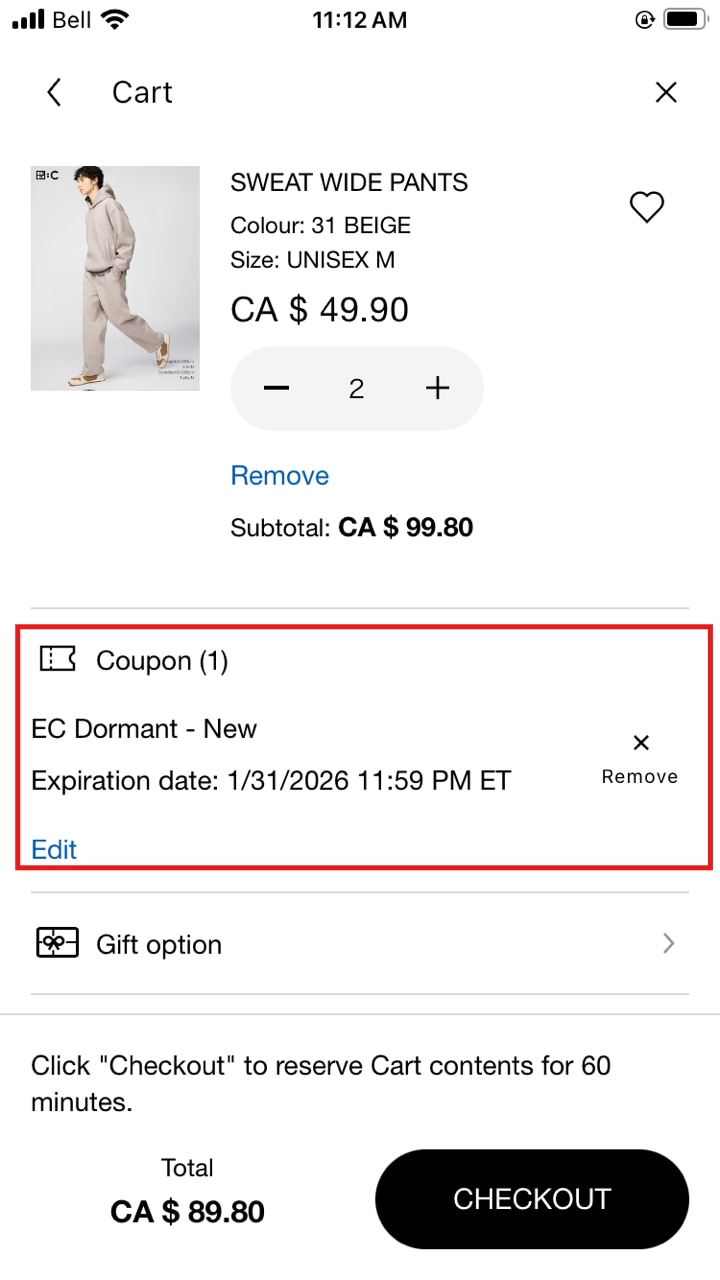
Validity: Coupons are one‑time use, one per order, and have an expiry date. Expired coupons disappear from your Wallet.
Where to find coupons: Only use coupons shown in your UNIQLO account under your [COUPON WALLET]. You can’t type codes in manually, and third‑party promo sites may be invalid.
After you pay: We can’t add a coupon to an order that’s already placed. -
Can I use coupons UNIQLO stores in other countries?
No. Coupons only work in the country where they were issued.
Coupons issued outside Canada can’t be used in Canadian stores or on uniqlo.ca.
The same rule applies to promotions and limited offers from other countries.
Always check the coupon terms & expiry before you shop. -
Do you offer coupon codes for students?
Not at this time.
You may still have other savings available:
Check your Coupon Wallet in the UNIQLO app or your online account.
Check out the types of coupon we offer [Here]. -
Can I add a coupon code to my order after it has been placed?
No. Coupons must be selected and applied at checkout (in‑store or online).
Once an order is placed, we can’t add a coupon or refund its value.
Tip: Before paying, open your Coupon Wallet, select your coupon, and tap Apply. Double check the checkout page to see if the coupon has been applied correctly.
If you need more help related to coupon issue, Please [CLICK HERE] to contact our customer engagement team.
Contact UNIQLO Canada
 BY CHAT
Monday to Sunday: 9:00am to 6:00pm ET
Closed: Christmas Day
Monday - Sunday: 9am to 6pm ET
Closed: Holidays
Monday - Sunday: 9am to 6pm ET
Closed: Holidays